
**Avoid routing conflicts** The following applies to a routed TUN setup which should just about always be the way to setup OpenVPN. In order to avoid routing conflicts one should choose subnets carefully for the networks **under ones control**. These should be RFC 1918 compliant, https://tools.ietf.org/html/rfc1918. ``` 10.0.0.0 - 10.255.255.255 (10/8 prefix) 172.16.0.0 - 172.31.255.255 (172.16/12 prefix) 192.168.0.0 - 192.168.255.255 (192.168/16 prefix) ``` 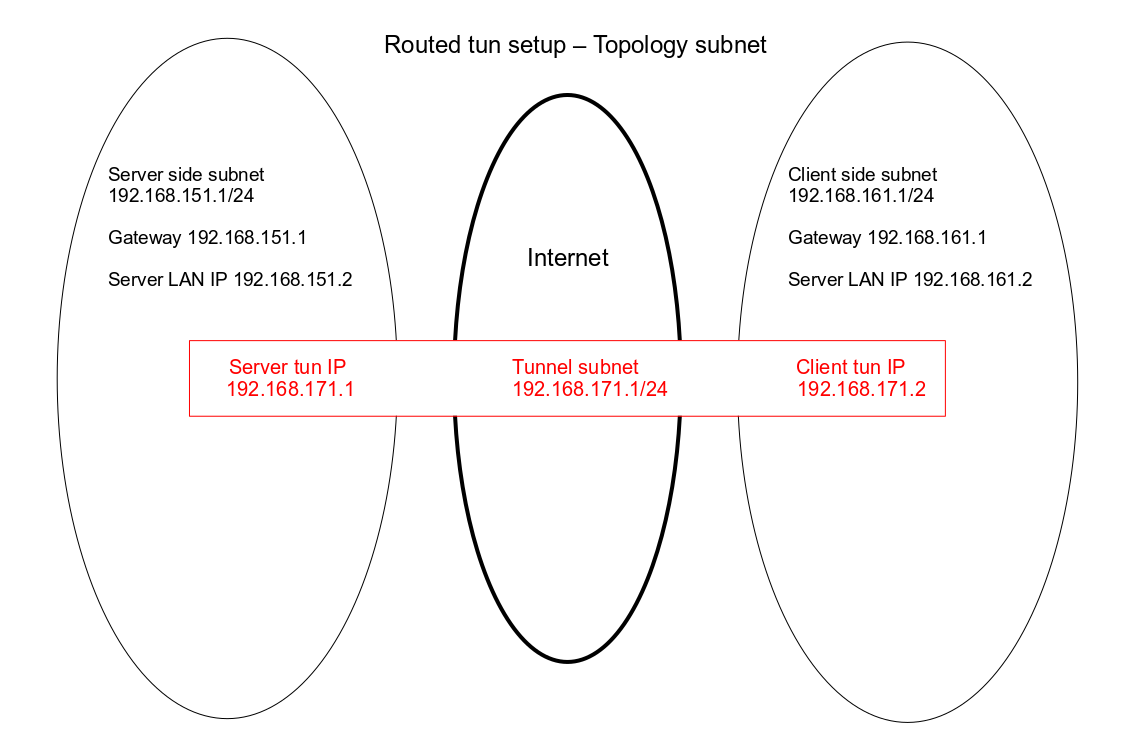 Traveling clients like laptops and mobile phones mostly have no control over the network they reside. In those cases it becomes even more important to choose **uncommon** subnets. In the simplest form there are three networks involved, see Figure 1: 1. The Server side subnet 2. The Tunnel subnet 3. The Client side subnet Figure 1 There may be no overlap between 1, 2 and 3. Basically, normal routing applies which should now be obvious to the network admin. The following (incomplete) list is comprised of default settings for routers/acces points/switches/etc. These are common subnets one should try to avoid: ``` 10.0.0 10.0.1 10.1.1 10.1.10 10.2.0 10.8.0 10.10.1 10.90.90 10.100.1 10.255.255 169.254 # APIPA # 172.16.0 172.16.16 172.16.42 172.16.68 172.19.3 172.20.10 # IPhone built-in hotspot # 192.168.0 192.168.1 192.168.2 192.168.3 192.168.4 192.168.5 192.168.6 192.168.7 192.168.8 192.168.9 192.168.10 192.168.11 192.168.13 192.168.15 192.168.16 192.168.18 192.168.20 192.168.29 192.168.30 192.168.31 192.168.33 192.168.39 192.168.40 192.168.42 # Android USB tethering # 192.168.43 # Android built-in hotspot # 192.168.50 192.168.55 192.168.61 192.168.62 192.168.65 192.168.77 192.168.80 192.168.84 # Google WiFi 192.168.85 # Google WiFi 192.168.86 # Google WiFi 192.168.88 192.168.98 192.168.99 192.168.100 192.168.101 192.168.102 192.168.111 192.168.123 192.168.126 192.168.129 192.168.137 # Windows Phone built-in hotspot # 192.168.168 192.168.178 192.168.190 192.168.199 192.168.200 192.168.220 192.168.223 192.168.229 192.168.240 192.168.245 192.168.251 192.168.252 192.168.254 200.200.200 ``` November 5 2019 by Pippin